Rota and HR software for shift teams
Run the shift.Not the spreadsheet.
Plan the week, record the hours and hand them to payroll, with every contract, check and review alongside.

Stop doing rotas in Excel
A rota is never finished.
Call-offs, swaps by text and hours on paper, sorted in one place.
06:02 · Missed call
Can't make my shift today, sorry
Text message
Can I swap Saturday with Jamal?
Paper timesheet
Tue 6–2 · 8h?
This week
PublishedMeet Robin AI
Someone's called in sick.Robin's already on it.
Robin is the AI built into TeamAgenda. It reads your rota, punch clock, leave and requests, spots what needs you, and gets it ready for you to confirm. Here's a week with it.
06:45 · Morning briefing
It's read everything before you're in.
The rota, the punch clock, leave and requests. Robin's briefing says what needs you today, and nothing else.
Ask it anything.Even the tricky stuff.
From a quick check to moving over from another system. Robin answers from your own TeamAgenda, with your permissions, and shows what it checked.
What needs me today?
Three things, the most urgent first.
Today
Dashboard- Sam's off sick12:00–18:00 has nobody yetWho could cover?
- Aisha's on holiday next Thursday to Saturday26 – 28 Nov, approvedOpen the agenda
- 8 requests are waiting for you6 timesheets, a holiday and a swapApprove punches (6)
Or just ask what's on your mind
- What should I sort before the weekend?
- Are we short anywhere next week?
- Is everyone in yet?
- Which shifts have felt toughest lately?
- Who could cover Sunday's close?
- Who's worked the most hours this week?
- Publish next week for me
- How do I set up break rules?
- Where do I change who can approve leave?
- How do I add a new starter?
- When's my next weekend off?
- Has my holiday been approved yet?
- Which open shifts fit my availability?
- How much have I earned this month?
- When does this pay period end?
- Who's working with me tomorrow?
- Can I swap my Saturday for a weekday?
- How many hours did I do last week?
- Did my swap with Chloe go through?
- Can I have the 24th off?
Reads, never guesses
Every answer comes from your TeamAgenda, looked up as you ask: shifts, the punch clock, leave, pay periods, approvals. Nothing from the internet, nothing made up.
Shows its working
Each answer says what Robin checked. The cards under it are built from the data itself, so they can't show a figure Robin didn't find.
Prepares. You confirm.
A holiday request, cover, a swap, even next week's agenda: Robin gets it ready as a card, and nothing happens until you press Confirm.
Sees only what you can
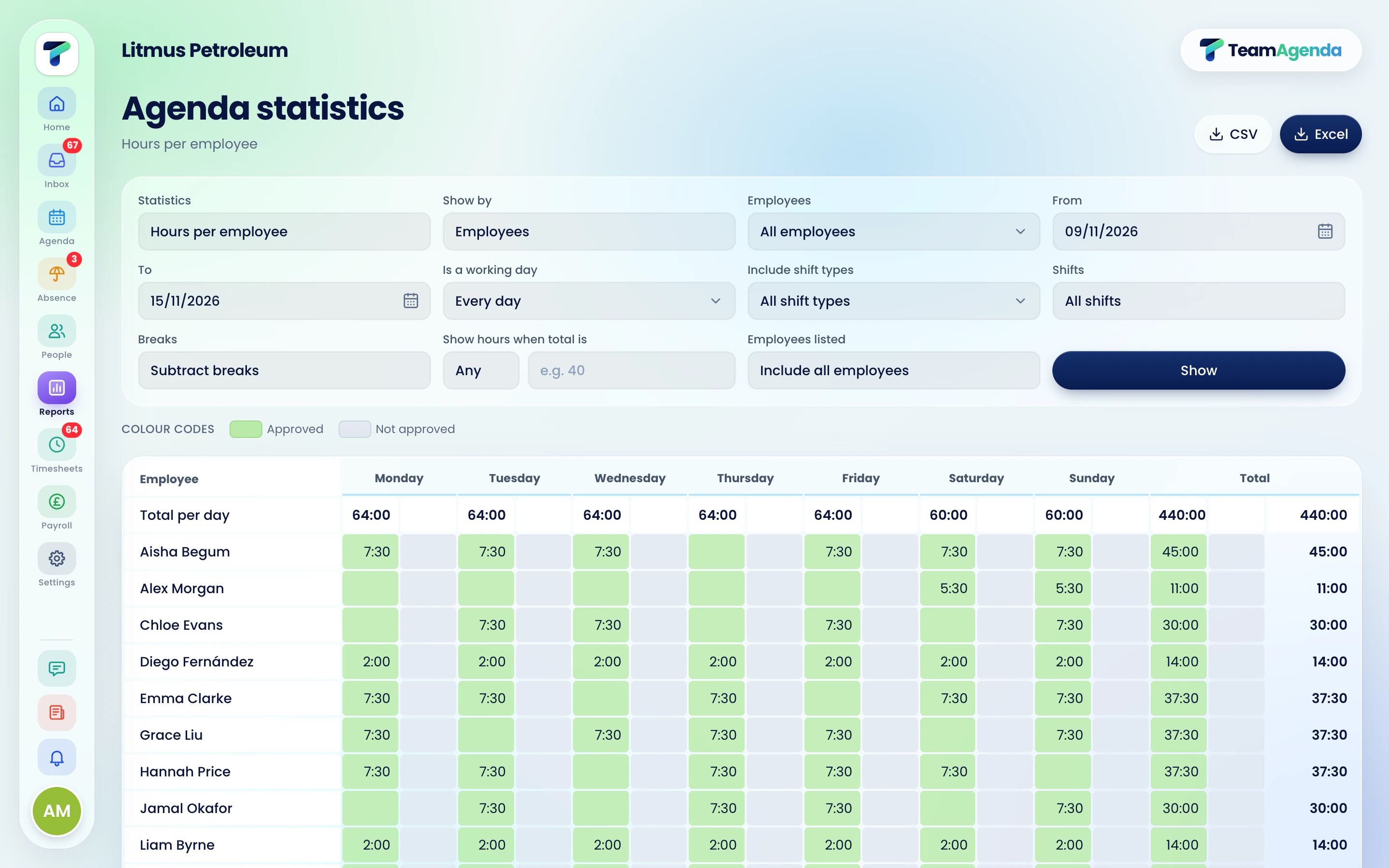
Rota management software
Plan the week, track the hours, pay the team.
The real screens, from the rota to the payslip.


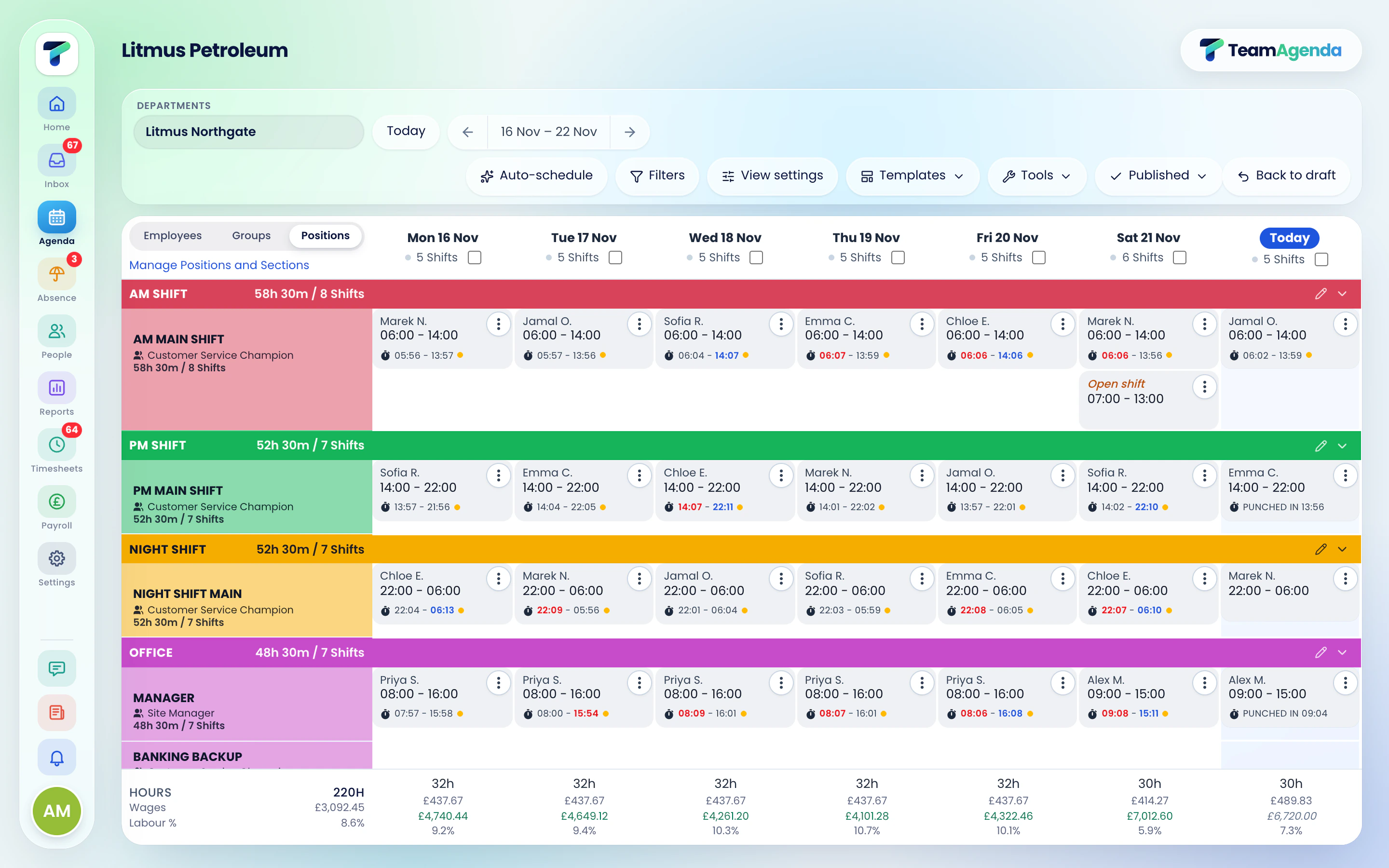
The weekly agenda: An online rota planner: drag shifts onto roles and sites, watch wages and labour % as you go, and publish when it's right.
Shift planning
Build next week's rota in minutes, not evenings.
Shift planning software that checks the rules before you publish.
- Templates and auto-schedule
- Live wages under every day
- Open shifts and swaps
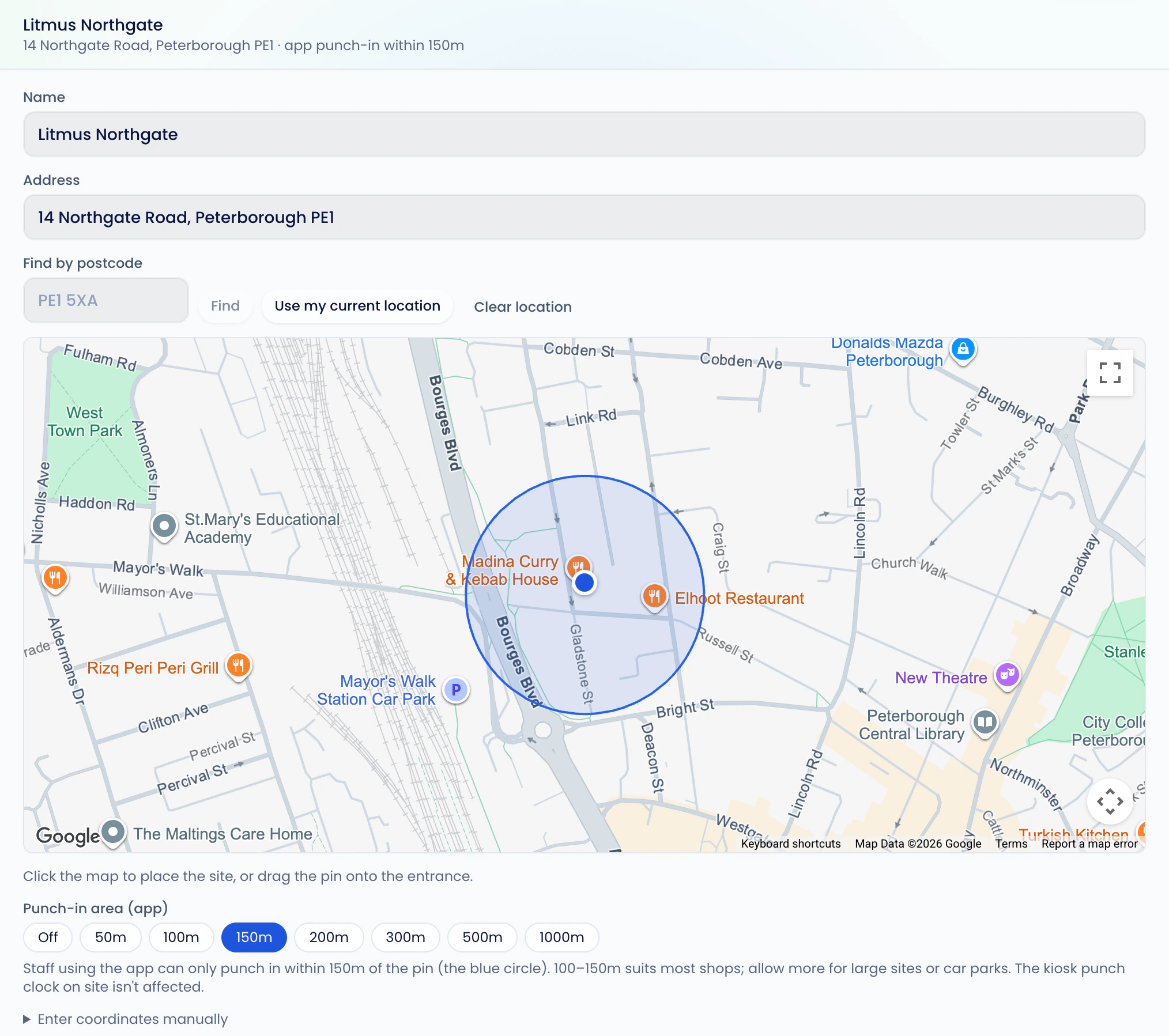
Geofencing
Clock-ins that only work at the site.
Draw a geofence around each site on the map. Staff can clock in on their phone inside it, and not from the bus or the sofa.
- Geofence per site
HR, built in
The rota and the HR file, in one place.
Everything you keep about each person sits next to the shifts they work. One login, one price, and no second system to keep up to date.
Emma Clarke
Care assistant · started 2 Nov
- ContractSigned in the app
- Right to workChecked · proof on file
- New starter checklist9 of 15 done
- Food hygiene level 2Booked for Thursday
- First supervisionBooked Tue 10 Nov
- DBS checkEnhanced · applied
Letters, contracts and policies
18 UK templates, from offer letters to written warnings. Fill in the blanks, check the draft, and staff sign in the app.
Onboarding and leaving checklists
Every new starter and leaver gets the same steps, started for you, with due dates and a tick for each one.
Supervisions, 1:1s and appraisals
Booked, prepared for, written up and signed. You can see who's overdue at a glance.
Training and DBS checks
Courses and DBS checks by role, with certificates on file, reminders before they run out and a warning on the rota.
Who it's for
Your doors don't close at five. Neither does the rota.
Rota and HR software built in the UK, for one site or fifty.
- Forecourts
- Convenience and retail
- Pubs and restaurants
- Hotels
- Care homes
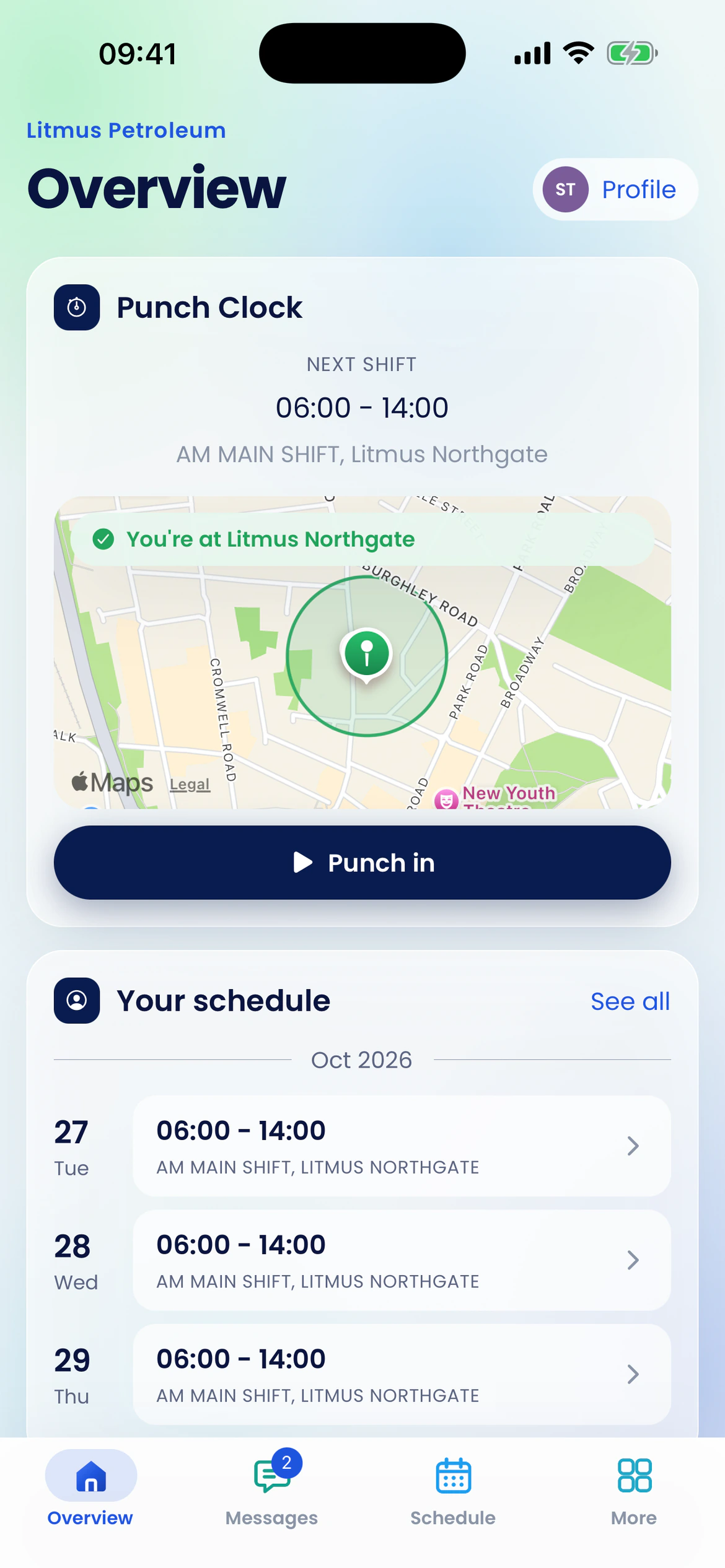
The staff rota app
Your team's week, in their pocket.
A staff rota app that answers the question before they text you it.
- Clock in on site
- Shifts and swaps
- Holiday
- Payslips
First 5 people free, always
Simple pricing. Every feature included.
Free for up to 5 people, for good. From your 6th, £2.49 a person a month on annual.
- 2 months free in your first year
- Priority support, with a named contact
- We move your data for you (20+ people)
- 30-day money-back
£0 today · No charge until your 6th person · Cancel online
Founders' price:be one of our first 49 businesses to start a plan and your price won't rise for 24 months.Only 49 places.
Every feature included, on both plans
- Rotas and shift swaps
- Clock-in and timesheets
- Holiday and absence
- Payroll export
- HR records and documents
- Right to work checks
- Training and DBS
- Team messaging
- Robin AI assistant
- The TeamAgenda app
- As many sites as you have
- Rotas and shift swaps
- Clock-in and timesheets
- Holiday and absence
- Payroll export
- HR records and documents
- Right to work checks
- Training and DBS
- Team messaging
- Robin AI assistant
- The TeamAgenda app
- As many sites as you have
- 1Sign up freeAdd a card: £0 today. Up to 5 people are free for good.
- 2Add your 6th personPick annual or monthly. 14 days free before your first payment.
- 3Pay as your team growsThe bill follows your team. Cancel online any time.
Questions first? Talk to us. A real person in the UK replies.
- Same price at checkout
- No setup fees
- Cancel online
- Secure payments by Stripe
Questions, answered
Getting started
How long does it take to get set up?+
Most businesses are up and running in an afternoon. Add your sites, import your staff from a spreadsheet (or add them one by one), bring over their holiday balances, then build your first week's rota. Your staff get an email to set their password, and they can see their shifts straight away. If you'd rather we did it for you, email support@teamagenda.co.uk and we'll set up your account.
Do my staff need to download an app?+
No. Staff can use TeamAgenda on any phone through teamagenda.co.uk, which works just like an app: shifts, clocking in, holiday requests, swaps and payslips. Our iPhone and Android app is on its way to the App Store and Google Play, and it's included for your whole team at no extra cost.
We use spreadsheets or another rota app. Can we move across?+
Yes. Download our staff template, fill it in from your spreadsheet or your current app's export, and upload it: everyone is added in one go, at the right sites and groups. Holiday balances can be imported too, from your current system's export, so nobody loses the time off they've built up.
Robin AI
What is Robin AI?+
Robin AI is the assistant built into TeamAgenda, on the website and in the app. Ask it about your shifts, hours, holiday, pay periods and requests, or how to do something, and it answers from your own TeamAgenda, as you. Managers can also ask about their team's agenda, today's attendance and what's waiting for their approval, and get a short briefing each morning. It's included on every plan.